

TL;DR Lead scoring fails when it's built as a marketing exercise instead of a sales tool. The model that actually gets used separates fit from engagement, decays stale signals, subtracts points for disqualifiers, sets thresholds that mean something to the people making calls, and recalibrates quarterly based on closed-won data.
Why do sales teams ignore HubSpot lead scores?
Every HubSpot portal above the Professional tier has lead scoring available. Very few portals have a scoring model that sales actually checks before making a call.
The gap is almost always the same: the model was built by marketing, for marketing, using marketing logic. It counts form fills and email opens. It doesn't distinguish between a VP of Finance at a target account and an intern downloading an ebook for a class project. Both get the same score. Sales notices. Sales stops looking.
The deeper issue is architectural. A single number that blends "who someone is" with "what they've done" produces scores that are impossible to interpret. A 75 could mean a perfect-fit contact who hasn't engaged yet, or a terrible-fit contact who's clicked everything you've ever sent. Sales can't act on ambiguity.
Lead scoring isn't a marketing feature. It's pipeline infrastructure. If sales doesn't trust it, it doesn't exist.
What's the difference between fit scoring and engagement scoring?
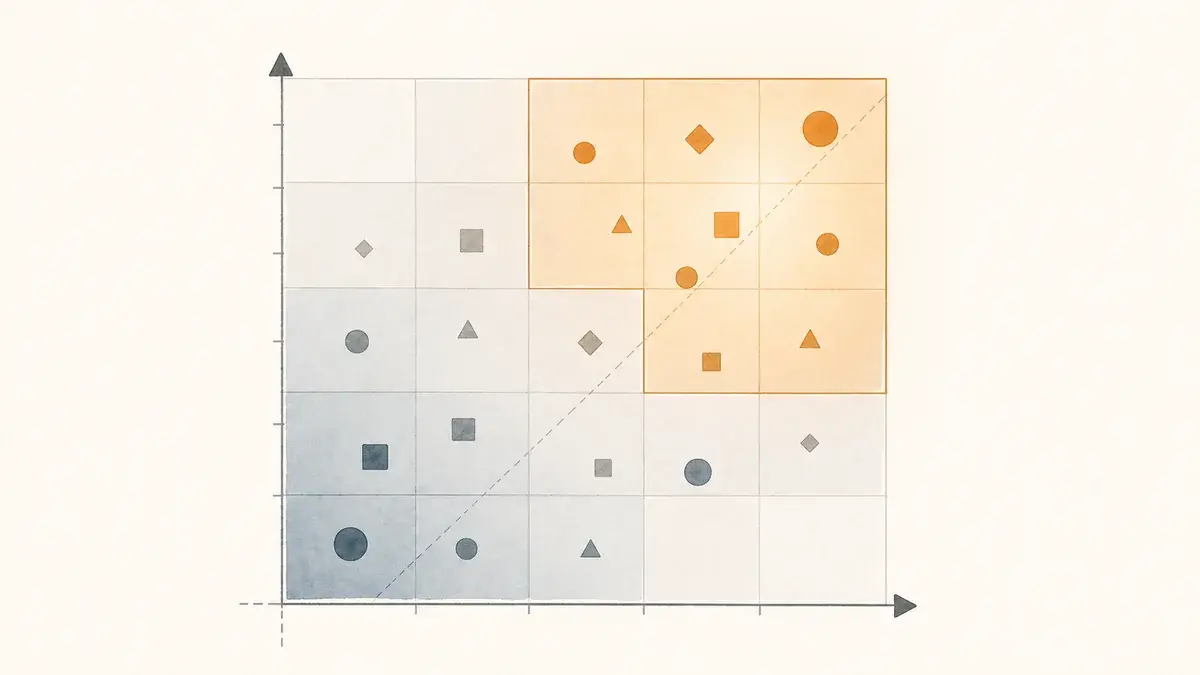
Fit measures who they are: job title, company size, industry, revenue, region. Static, no decay. Engagement measures what they've done: page views, form submissions, email clicks, meetings. Dynamic, decay-enabled. HubSpot's combined score keeps both legible in an A1 to C3 matrix, so a rep reading A2 knows strong fit, moderate engagement, worth a call.
HubSpot's current lead scoring tool supports three score types: engagement-only, fit-only, and combined. The combined score is where the model gets useful. It evaluates fit and engagement as separate dimensions and maps them into an A1–C3 matrix.
Fit measures who they are. Engagement measures what they've done. The combined score tells you both at once, but keeps them legible.
Fit Score
Evaluates demographic and firmographic properties: job title, company size, industry, annual revenue, region. Answers the question: "Is this someone we should be talking to?" Uses property groups. Static. No decay.
Engagement Score
Evaluates behavioral events: page views, form submissions, email clicks, meeting bookings, CTA interactions. Answers the question: "Are they paying attention right now?" Uses event groups. Dynamic. Decay-enabled.
This separation is what makes the model actionable. A sales rep glancing at the CRM card can immediately see: A2 means strong fit, moderate engagement, worth a call. C1 means poor fit, high engagement, probably not a buyer, possibly a researcher or competitor. That signal clarity is what earns trust.
How do you build a fit score in HubSpot?
The fit score is your ICP encoded as a scoring model. It should reflect the characteristics of contacts who have actually become customers, not the contacts you wish you had.
What to Score Positively
- Job titles that match your buyer personas (weighted by seniority and decision-making authority)
- Company size ranges within your serviceable market
- Target industries where you have proven results
- Geographic regions you actively serve
- Annual revenue bands that align with your pricing
What to Score Negatively (or Exclude)
- Job titles that never convert: students, interns, unrelated departments
- Company size below your minimum viable account
- Industries you don't serve or have historically failed in
- Competitors (better as an exclusion list than negative points)
- Internal employees and existing customers (exclusion list)
A key distinction: negative scoring and exclusion lists serve different purposes. Negative scoring adjusts the score for contacts who might be a fit but have disqualifying attributes. Exclusion lists remove contacts who should never be evaluated at all. If someone should never qualify regardless of their behavior, exclude them. Don't try to subtract their way to zero.
How do you build an engagement score with decay?
Score behavioral events by intent, not volume: a demo request outweighs a newsletter signup, pricing page views outweigh blog reads, and email opens don't count at all. Enable decay on every event group so points fade over one to six months, and cap how much any single event type can contribute. Without decay, the score is a museum of past activity.
Engagement scoring captures behavioral signals. But here's where most models go wrong: they treat a form submission from last week the same as one from eight months ago. Without decay, your scoring model is a museum of past activity, not a signal of current intent.
Event Groups to Include
- Form submissions (weight by form type: a demo request and a newsletter signup are not the same signal)
- Page views on high-intent pages: pricing, case studies, product/service pages
- Email clicks (not opens, which are unreliable post-iOS 15)
- Meeting bookings
- CTA clicks on bottom-of-funnel content
- Return visits after period of inactivity (re-engagement signal)
Enable Decay on Everything
HubSpot's lead scoring tool lets you enable score decay per event group, with intervals at 1, 3, 6, or 12 months. Decay follows linear logic. If you award 10 points for a form submission with 50% decay at 3 months, those points drop to 5 after 3 months and hit zero at 6 months.
Recommended Decay Settings
- Email clicks → +3 pts · Decay: 50% / 1 month
- Form: newsletter signup → +5 pts · Decay: 50% / 3 months
- Form: demo request → +20 pts · Decay: 50% / 6 months
- Page view: pricing page → +8 pts · Decay: 50% / 1 month
- Page view: case study → +5 pts · Decay: 50% / 3 months
- Meeting booked → +25 pts · Decay: 50% / 6 months
Two things to watch. First, use HubSpot's "Limit to" feature on event groups to cap how many points a single event type can contribute. A contact who clicks 40 emails shouldn't score 120 on engagement alone. Second, don't score email opens. Apple's Mail Privacy Protection inflates open rates to the point where they're unreliable as intent signals.
Where should the MQL threshold sit?
A score is just a number until you define what it triggers. HubSpot's combined score maps fit and engagement into a matrix: A/B/C for fit quality, 1/2/3 for engagement level. The intersection is where the handoff lives.
The starting framework: 100-point combined scale, split evenly (50 fit, 50 engagement). MQL trigger fires at A1, A2, and B1. Everything else stays in marketing's domain.
But the numbers only work if they're validated against reality. Pull your closed-won data and look at the score distribution. If contacts above your MQL threshold don't convert at a meaningfully higher rate than those below it, the threshold is wrong, or the model is.
How do you build the MQL handoff workflow?
Trigger on the combined score reaching A1, A2, or B1. Set lifecycle stage to MQL, create a task for the owner with fit score and last engagement, notify them, and round-robin unowned contacts. Add re-enrollment so a contact who decays out and re-qualifies alerts sales again, and a branch that routes contacts with an open deal to a deal-level notification instead.
The score triggers the handoff. The workflow makes it operational. Without the workflow, you have a number in a field that nobody checks.
What the Handoff Workflow Should Do
- Trigger: Combined lead score threshold updates to A1, A2, or B1
- Update lifecycle stage to MQL
- Create a task for the contact owner with context: name, company, fit score, last engagement event
- Send internal notification (email or Slack) to the contact owner
- Branch: if contact has no owner, route via round-robin assignment
- Set Lead Status to "New" or "Open" to signal sales action needed
Two additions most teams skip. First, add a re-enrollment condition. If a contact drops below MQL threshold (due to decay) and later re-qualifies, sales should be notified again. This is a re-engagement signal. Second, add a branch for contacts who reach MQL but already have an open deal. These shouldn't re-enter the top of the sales process; they should trigger a deal-level notification instead.
How often should you recalibrate a lead scoring model?
A scoring model is a hypothesis. It encodes your best guess about which attributes and behaviors predict conversion. That hypothesis needs to be tested, and most orgs never test it.
The Quarterly Review
Every quarter, pull two reports:
- Threshold validation: Conversion rate for leads above your MQL threshold vs. leads below it. If both rates are similar, the model isn't differentiating.
- Score distribution of outcomes: What did closed-won contacts score at the time of MQL? What did closed-lost contacts score? If the distributions overlap significantly, the model's signal is weak.
What to Do with the Data
- Adjust point values for criteria that don't correlate with closed-won outcomes
- Add new criteria that closed-won contacts had in common but weren't being scored
- Remove or reduce criteria that closed-lost contacts also matched
- Reset engagement scores for closed-lost contacts so they can re-enter the funnel clean
- Tighten or loosen the MQL threshold based on volume vs. quality trade-off
The model that wins isn't the one that's most sophisticated on launch day. It's the one that gets recalibrated on the 90th day.
Frequently asked questions
How should an agency set up lead scoring in a client's HubSpot portal?
Build the fit score from the client's closed-won data, not their wish list, and get sales to sign the MQL threshold before the workflow goes live. Use the same structure across portals (fit and engagement separated, decay on, exclusion lists for employees, customers, and competitors) so the quarterly review is one process rather than one per client. Report threshold validation to the client every quarter.
How does score decay work in HubSpot lead scoring?
Score decay automatically reduces an engagement event's point value over time. You can set decay intervals of 1, 3, 6, or 12 months. Decay applies per event and follows linear logic: 10 points with 50% decay at 3 months drops to 5 at 3 months and 0 at 6. It ensures your scores reflect current engagement rather than historical activity.
Should you use negative scoring or exclusion lists in HubSpot?
Use both, for different purposes. Negative scoring works for contacts who might be a fit but show disqualifying attributes or disengagement signals. Exclusion lists work for contacts who should never enter the scoring model at all: internal employees, existing customers, known competitors. If someone should never qualify regardless of behavior, exclude them rather than subtracting their way to zero.
How often should you recalibrate a lead scoring model?
Quarterly is the standard cadence. Pull two reports: conversion rate for leads above vs. below your MQL threshold, and the score distribution of closed-won vs. closed-lost deals. If the rates are similar or the distributions overlap heavily, adjust point values and threshold. Major changes to your ICP, product, or pricing warrant immediate recalibration.
Is your lead scoring model earning its place?
We build scoring models that sales actually uses: fit and engagement separation, decay, and the quarterly feedback loop most teams skip.
Let's Build It →